Your supervisor dashboard
What the four tiles mean and how to get to the next piece of work.
You become a supervisor when a company admin adds you to a programme and you accept the invitation. After that, signing in opens your dashboard.
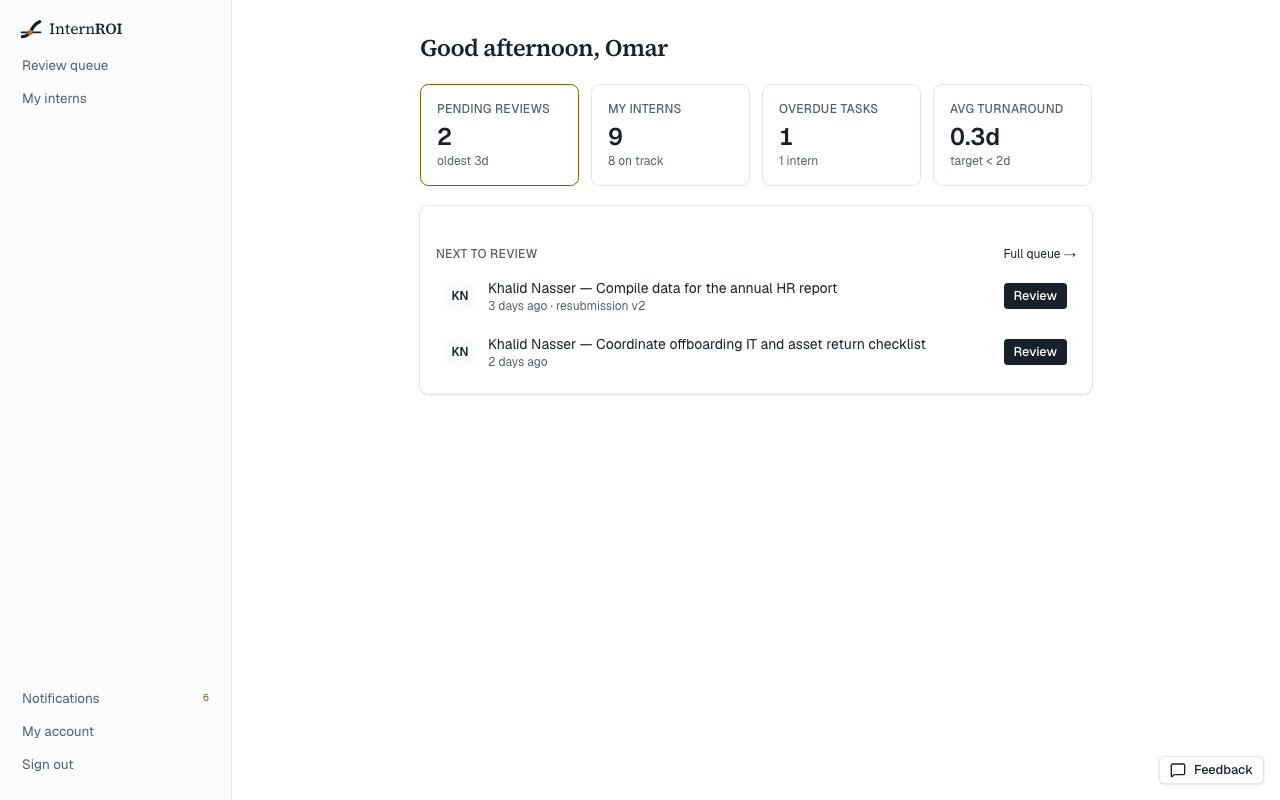
The four tiles
- Pending reviews — submissions waiting for you, and how long the oldest has waited. Choose it to open your review queue.
- My interns — how many interns you supervise, and how many are on track. Choose it to see each intern and where they stand.
- Overdue tasks — tasks past their due date and not yet accepted.
- Avg turnaround — how long your reviews take on average. The target is under two days.
The counts cover every programme you supervise, not just one.
Next to review
Below the tiles, Next to review lists up to three submissions, oldest first, with a Review button on each. Full queue → opens the whole queue. When nothing is waiting you will see You're all caught up. ✓
Your menu
Your menu has Review queue and My interns, plus Notifications, My account and Sign out at the bottom. Use the Feedback button on any screen to tell us about a problem.