See all your interns
Every intern you supervise, with their progress and what is waiting on you.
Choose My interns in the menu, or the My interns tile on your dashboard. The page lists every intern assigned to you, across every programme you supervise, in one band per programme.
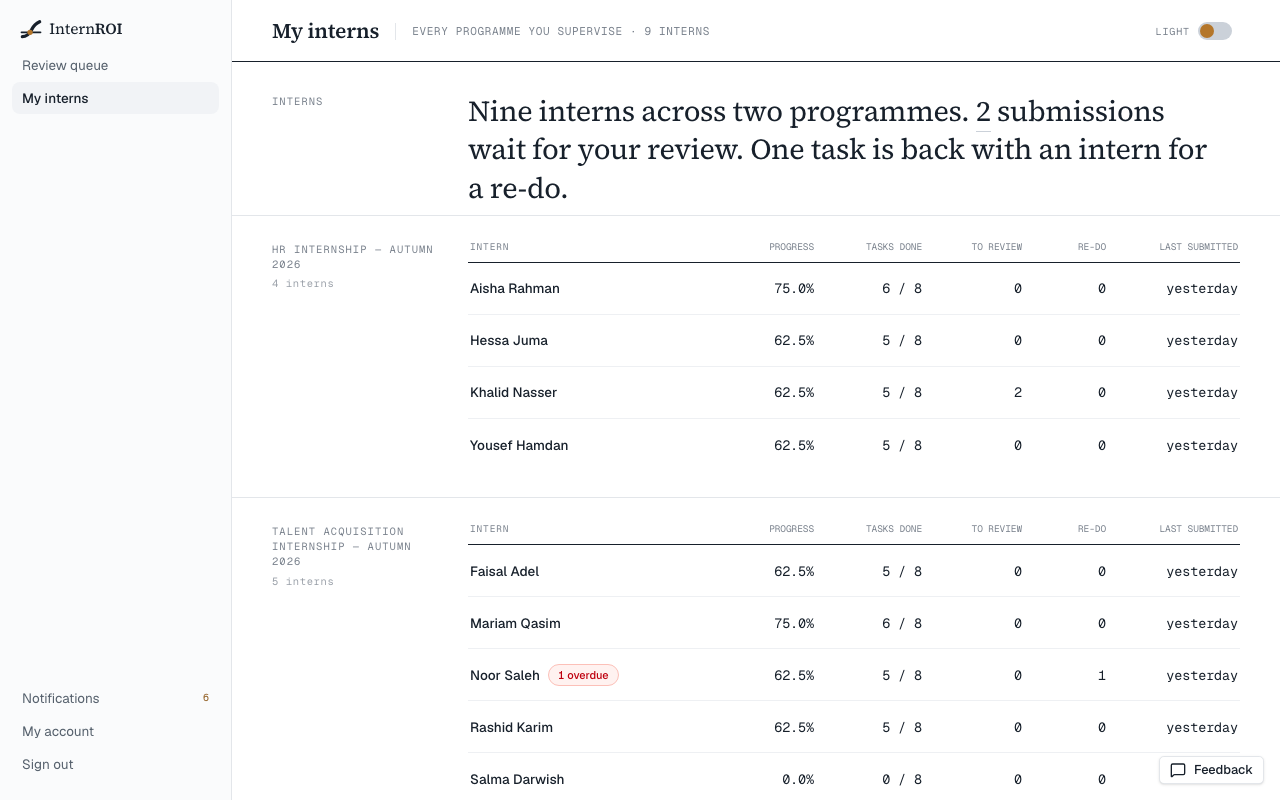
What the page tells you
The opening sentence says how many interns you have and on which programmes, and how many submissions wait for your review — choose that number to open your review queue. It also says how many tasks are back with interns for a re-do.
Each intern’s row shows:
- Progress — the share of their task weight that has been accepted, the same measure their own dashboard shows. A — means nothing they hold carries weight yet, so there is nothing to measure.
- Tasks done — accepted tasks out of the tasks assigned to them.
- To review — their submissions waiting for you.
- Re-do — their tasks you sent back that they have not resubmitted yet.
- Last submitted — how long ago they last submitted work.
An intern with tasks past their due date also shows a red overdue count beside their name.
Go further
Choose an intern’s name to open that programme’s roster. It lists your interns on that programme only, and adds whether each is on track or behind.
If the page says No interns are assigned to you yet., no admin has paired you with an intern. Interns appear here as soon as they are assigned to you.