Join a programme you were invited to
For supervisors and interns: accept your invitation by creating your account or signing in.
Supervisors and interns don’t sign up on their own. A company admin adds you to a programme and sends you an invitation by email, and the link in that email is your way in. An invited admin joins the same way.
Open your invitation
Choose the link in the invitation email. It opens Join your programme, which says who invited you and to what — for example, “Al Dana Consulting invited you to Summer Internship 2027 as an intern.” Your Email is already filled in: it is the address the invitation was sent to, and it can’t be changed here.
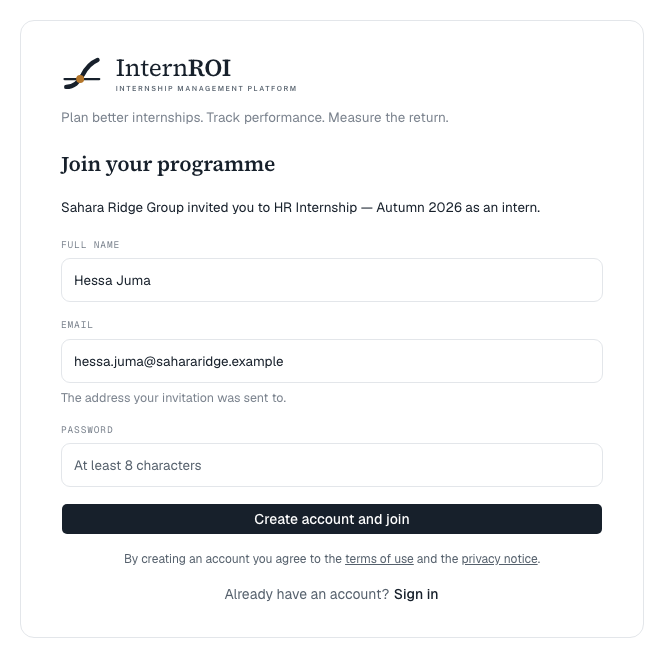
New to InternROI
- Enter your Full name and a Password of at least 8 characters.
- Choose Create account and join.
- You will see Check your inbox — we sent a confirmation link to finish setting up. Open the email and choose the link. If it does not arrive, check your spam folder.
The confirmation link signs you in and accepts the invitation, and you land on your dashboard.
Already have an account
Under the form, choose Sign in (“Already have an account?”). Enter your Password and choose Sign in and join. Forgotten it? Choose Forgot password? — see Sign in and reset your password.
Already signed in
If you are signed in with the invited address and are not on a programme yet, your home screen shows Your invitation is waiting, with an Accept button. You don’t need the link at all.
If you are signed in with a different address, the link tells you so. Choose Switch account, then sign in — or create an account — with the invited address.
Messages you might see
- This invitation has expired. Ask your programme admin for a new one. — links last 14 days.
- This invitation link is not valid. — usually an older link that a resend replaced. Use the newest email.
- This invitation has already been used. — you have already joined. Sign in.
- New accounts are paused for the moment. — if you already have an account, sign in with it to accept the invitation.
More in Problems accepting an invitation.