Get a programme ready to launch
The six setup steps, what launching does, and what can hold it up.
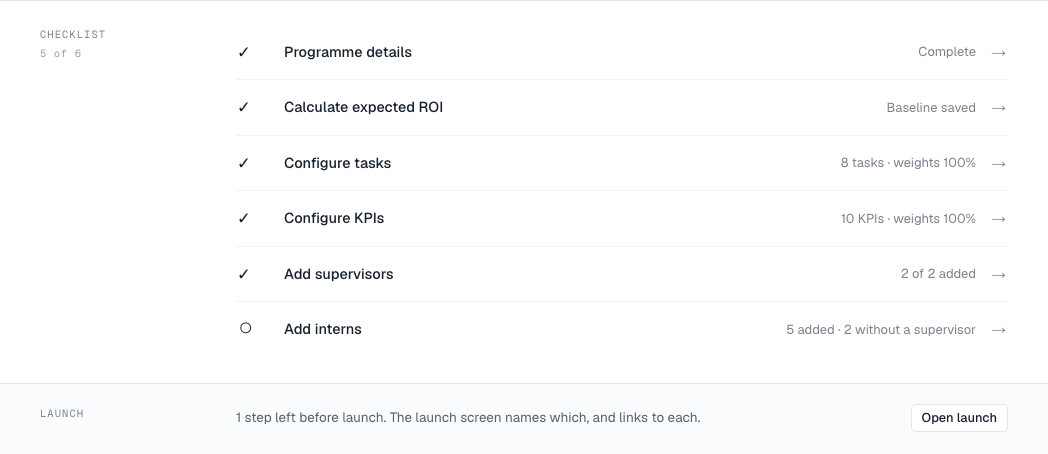
A new programme opens on its setup checklist. Each row links to where it is done.
The six steps
- Programme details — finish the wizard.
- Calculate expected ROI — save a baseline. See Fill in the ROI wizard.
- Configure tasks — at least one task. See Build the task plan.
- Configure KPIs — at least one KPI, weights totalling exactly 100%. See Set up KPIs.
- Add supervisors — see Add supervisors.
- Add interns — at least one, and every intern needs a supervisor. See Add interns.
Your company also needs to be verified, and to have an active plan or an open payment window.
Launch
- Choose Launch on the checklist.
- Read What launching does, then choose Launch programme.
- Confirm with Yes, launch.
Launching:
- gives every intern every task, and notifies them;
- opens the supervisors’ review queue;
- starts measuring KPIs against the baseline you saved;
- locks the programme details and the task plan.
You can still add interns and supervisors after launch. Interns added later get every task automatically.
What can hold it up
The launch screen names anything missing and links to it. The ones that come from your company rather than the programme:
- Verify your company before you can launch
- Choose a plan before launching — your payment window has closed.
- Your plan covers … interns, and launching this needs … — add interns to your plan, or take some off this roster. See Change your plan.
- Your plan allows … concurrent live programme(s). — end or archive a running programme first.