The Emiratisation screen
Check what your programmes claim towards the quota against what your roster records.
Choose Emiratisation in the menu. Only company admins can see it.
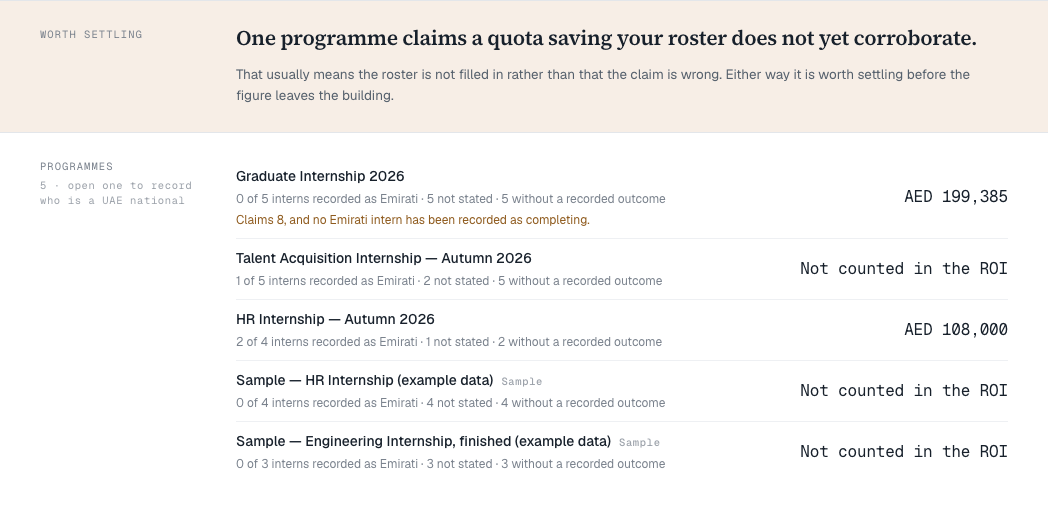
The screen puts two numbers side by side for each programme:
- what the programme’s saved ROI baseline claims towards the Emiratisation quota, and
- what your own roster records — interns marked as UAE nationals who completed the programme.
It never decides which is right. The roster may be incomplete, or the claim may be high, and only you know which.
Record who is a UAE national
- Open a programme from the Programmes list.
- For each intern, set UAE national to Yes, No or Not stated, and set their Outcome: Still in progress, Completed, Withdrew or Ended early.
Each choice saves as soon as you make it. You can record these at any time, even after the programme has finished.
Nationality is optional. It is used only to evidence the quota saving your company claims, and it is never inferred from a name or an email address. Not stated is a complete answer.
Worth settling
A gold Worth settling band appears when a programme claims more than its roster records. Usually the roster just has not been filled in yet. Either way, settle it before the figure leaves your company.
What this screen does not change
The saving shown is the figure your saved baseline computed — it is never recalculated here, so this screen and your reports always agree. Changing a nationality or an outcome does not change the claim. To change the claim, edit the ROI assumptions and save a new baseline.
Whether a given intern counts towards your quota is your company’s judgement. Check the figure against current MoHRE guidance before you rely on it.