Accept work or request a re-do
Read a submission, rate it if asked, and record your decision.
Read the submission
A submission screen has, from top to bottom:
- The task — open Task instructions to see the brief and what was expected.
- Submission note — the intern’s summary of what they did, plus any files and links. Choose a file to open it. Files open through a private link that lasts a few minutes, so open them from this screen rather than saving the address.
- History — earlier attempts at the same task, with the decisions on them. If the intern was moved to you from another supervisor, you see that supervisor’s decisions and comments too. Earlier versions are never deleted.
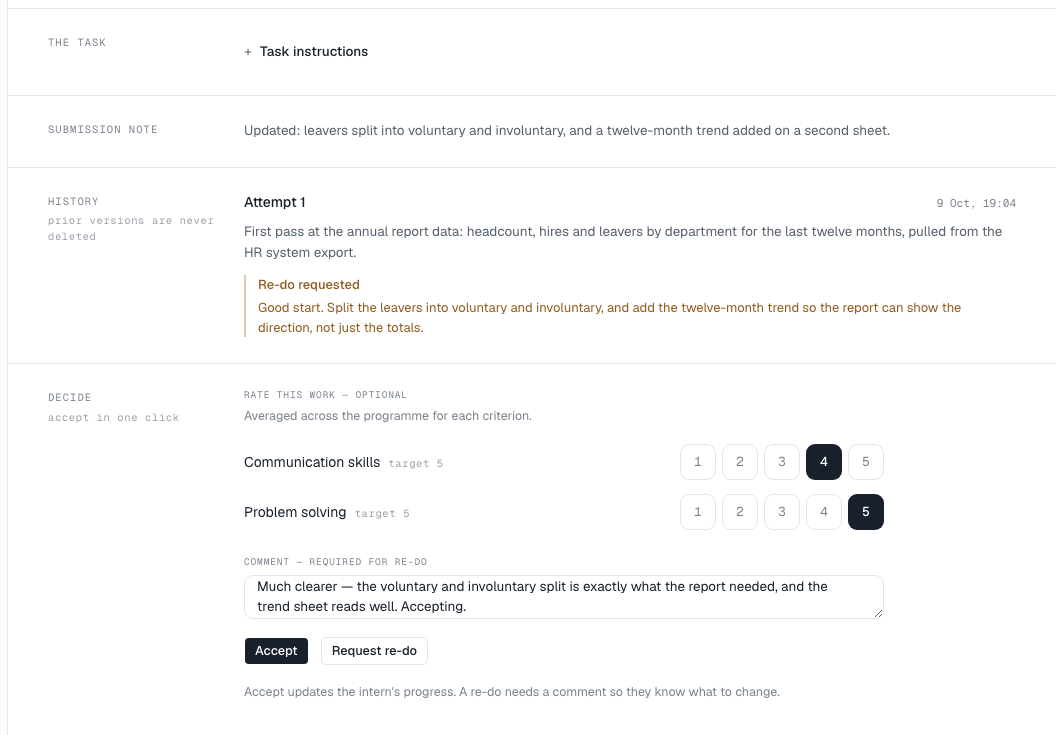
Decide
In the Decide band:
- If your programme uses rating criteria, you will see Rate this work — optional. Choose a score from 1 to 5 for each criterion, or leave it blank. Choose a selected score again to clear it.
- Add a comment in Comment — required for re-do. It is optional when accepting.
- Choose Accept or Request re-do.
- Accept marks the task accepted. The intern’s progress and KPIs update straight away, and they are told.
- Request re-do sends the task back with your comment, so the intern knows what to change. It needs a comment — without one you will see A re-do needs a comment so they know what to change.
After you decide, the next item in your queue opens automatically.
Messages you might see
- This submission has already been reviewed — someone has already decided it.
- A newer attempt has been submitted — review that one — the intern has resubmitted; open the newer attempt from your queue.
- You do not supervise this intern — the intern has been moved to another supervisor.